
WhatsApp enquiries, answered and recorded
The assistant replies in the customer's language, asks what they need and saves the lead. The team can take over any conversation in one tap.
View case studyLess manual work. Better workflows.
We build AI and WhatsApp automation in Doha, Qatar, for customer enquiries, lead handling and business workflows, with a clear handover to your team.
Start a Project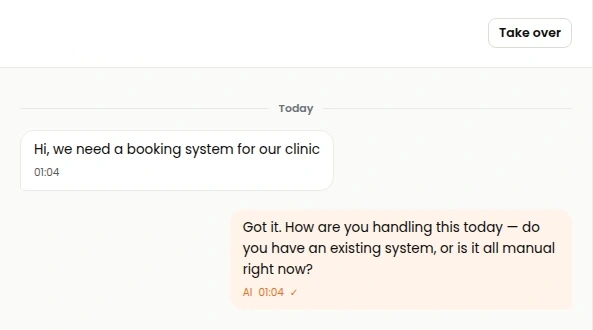
Replies, confirmations and updates sent from your business WhatsApp number.
Assistants that answer customer questions in Arabic and English from your own information.
First replies, qualifying questions and hand-over to a person when it is needed.
Repetitive steps between systems handled automatically, with a record of each one.
Name, need, budget and timing captured in the conversation and saved to the lead.
Each enquiry sent to the right person or team based on what it is about.
Staff ask about policies, products and procedures and get answers from your documents.
Follow-ups scheduled from the conversation and chased on time.
Tasks created for your team from enquiries, forms and messages.
Every automated conversation saved to the client record.
One inbox for the team, with assignment, notes and one-tap takeover from the assistant.
Response times, volumes and what customers ask for, week by week.
The assistant replies in the customer's language, asks what they need and saves the lead. The team can take over any conversation in one tap.
View case studyOcttoApps' WhatsApp assistant for businesses in Qatar: Arabic and English replies, lead qualification, meeting booking and a shared inbox for the team.
See the productAn enquiry should become a useful record, an assigned follow-up or a booked meeting. We define the questions the assistant should ask, the information it should save and the point at which a member of your team takes over.
The assistant needs approved service information, working rules and a clear boundary for what it can answer. We plan Arabic and English responses, escalation paths and the systems used to keep that information current.
Automations can connect enquiries with lead stages, tasks, reminders and reports. Explore Octto Assistant and our WhatsApp enquiry workflow to see how we use these capabilities on our own enquiries.
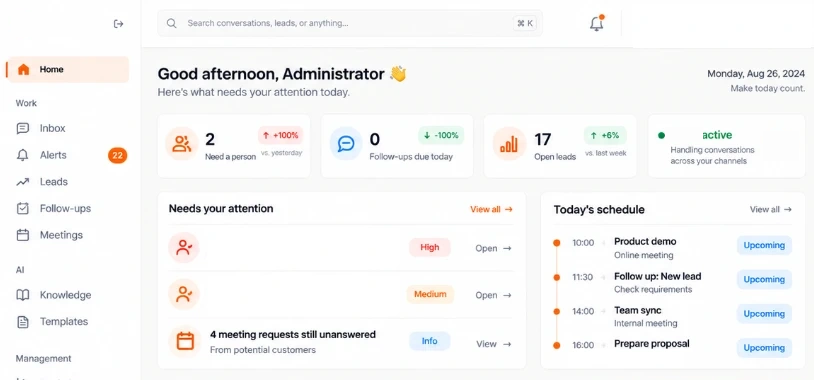
OcttoApps uses Octto Assistant on its own enquiries. The published workflow brings WhatsApp conversations into a shared inbox, supports Arabic and English replies, records qualified leads and assists with meeting booking. A team member can take over the conversation. The case study shows the inbox, follow-up queue and analytics, so you can review the workflow before discussing a similar setup.
Agree which service information, price lists, working hours and booking rules the assistant may use, and who maintains them. Describe the requests that need a member of staff, the context passed to that person and the records created during the conversation. That makes the automation scope specific to the way your team works.
For a website chatbot, agree where the chat appears, which questions it can answer and what lead details it may collect. Define Arabic and English wording, the approved information sources and the point at which the conversation goes to a person.
If the chat needs to create a lead record, request an appointment or retrieve customer information, agree the required fields, connected system and staff permissions. Test the widget on mobile, including keyboard use, closing the chat and continuing the enquiry. Scope website chat separately from WhatsApp account and messaging-provider setup.
Interactive demo
Send a sample enquiry from the website, then take over and reply from the staff inbox. This demo does not contact a real team.
Waiting for a website enquiry
Conversation DEMO-CHAT-01Yes. We scope the languages, tone and approved business information for the assistant. Testing should include common customer questions and a handover when the request needs a person.
Yes, these can be included in the workflow. We define the required fields, booking rules, availability source and the destination for lead records before implementation.
Yes. A clear handover to a person is part of the workflow design, with the context your team needs to continue the conversation.
We review your number, business setup, provider and intended use. Account approval, messaging rules and provider charges are confirmed for the selected integration before launch.
The workflow can be scoped around your approved business information. We identify the sources, the person responsible for updates and how common questions are tested. A request outside that information should follow the agreed handover process.
The workflow should identify when to transfer the conversation, which team receives it and what context is saved. Octto Assistant includes a shared inbox and human takeover so a team member can continue the enquiry.
Provider subscriptions, messaging charges and other recurring services must be identified in the quotation. They depend on the selected integration, account setup and usage; they should be reviewed separately from the development scope.
The project can be scoped around a shared set of approved answers and lead requirements. The website chat interface, WhatsApp integration and staff handover are separate parts to define and test. The published Octto Assistant example shows the WhatsApp workflow; website-chat requirements should be agreed in your project scope.