
How WhatsApp automation can work for a business in Qatar
A useful WhatsApp automation starts with one repeatable conversation: answer an enquiry, collect the information the team needs and pass the request to the right person. Define that workflow before choosing an AI tool or connecting business systems.
Choose a conversation your team handles often
Start with questions about services, a request for a quotation or a booking enquiry. Write down what the customer asks, which information the business needs and what should happen next. A lead enquiry might need a name, business need and preferred contact time; another process may need different fields.
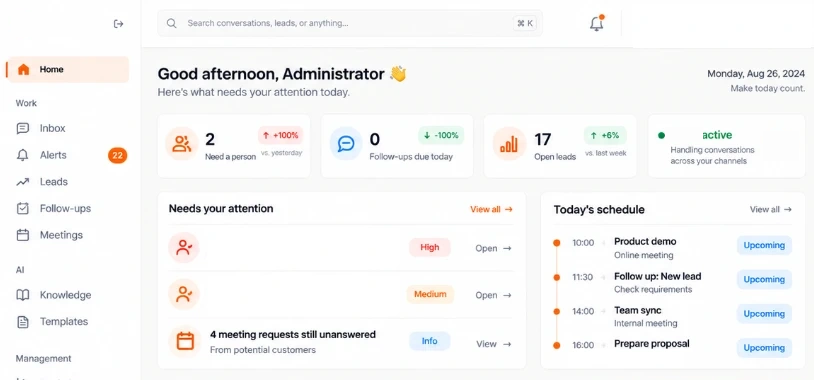
OcttoApps uses Octto Assistant for its own Arabic and English enquiries. The published workflow includes a shared inbox, lead capture, follow-up records and the ability for a team member to take over. That is a concrete example to review before scoping a similar system.
Build answers from approved business information
Identify the service descriptions, opening hours, price information and booking rules the assistant may use. Assign a person to keep that information current. The assistant should have a clear route for questions it cannot answer from approved sources.
Test the same intent in Arabic and English, including spelling variations and mixed-language messages. Confirm how names, phone numbers, dates and the conversation context are saved. Use sample enquiries that do not expose confidential customer information.
Define exactly when a person takes over
Decide which situations need staff: a customer asking for a person, an unclear requirement, an exception or a question outside the approved information. Specify which team receives the request and what context appears in the shared inbox.
The customer should not need to repeat every detail after a handover. Agree which summary and records are retained, who is responsible for follow-up and how the team can pause automated replies during a live conversation.
Connect only the records the workflow needs
A quotation enquiry may create a lead and task in a CRM. A booking enquiry may need calendar availability. An order update may need information from the business’s order system. Define the source of truth and which actions the automation is allowed to perform.
Start with the minimum permissions and records needed for the agreed journey. Test duplicate messages, missing fields, unavailable services and failures of connected systems. Decide how staff see an error and continue serving the customer.
Separate development from provider and usage charges
Confirm which WhatsApp integration and provider account will be used. Provider subscriptions, message charges, AI usage and other recurring services should be identified separately from development. Review current provider requirements and messaging rules before launch.
Do not assume that every outbound message, marketing campaign or customer interaction follows the same rules or costs. The chosen provider and account setup should be checked against the intended use, expected volume and customer permissions.
Measure whether the process helps your team
Before launch, agree what a successful conversation means: a useful answer, a complete enquiry, a booked next step or an effective handover. Review missed questions and incomplete leads so the approved information and workflow can be improved.
Begin with a defined set of enquiries and expand after the team has reviewed real results. A small workflow with clear ownership and reliable handover is easier to operate than an assistant that claims to handle every business decision.
Before you request a quotation
- One clearly defined enquiry or booking journey
- Approved Arabic and English information sources
- A staff handover rule and shared context
- Required CRM, calendar or order integrations
- Provider requirements and recurring charges
- Test cases, permissions and an owner for updates
Questions before you start
Does WhatsApp automation replace the customer-service team?
It can handle an agreed set of enquiries and organise information for staff. Define when a person takes over, how replies are paused and which decisions remain with the team.
Can WhatsApp enquiries connect to a CRM?
Yes, when the chosen CRM and integration support the required workflow. Scope the fields, permissions, duplicate handling and follow-up rules before implementation.
Discuss your project with our Doha team
Tell us your business process, launch requirements and the systems you need to connect.